
How to build a personal data centre on your desk
(thanks to Michael Power for this.)
For Wealth Managers: Private, Compliant, Offline AI. You handle client portfolios, trust structures, tax strategies, and confidential family office information. You cannot send that data to OpenAI, Anthropic, or any cloud API without compliance headaches, legal exposure, and client anxiety.
The solution is not a better cloud contract. It is “no cloud at all”.
What You Are Building
A “private, offline AI server” that sits on your network, runs on a Mac Mini, and gives you the same capability as GPT-4 or Claude – without any data leaving your office.
Component | What It Does | Cost |
- Mac Mini M4 (32GB RAM) | The server (your “data centre”) | $799
- Your existing laptop (any brand) | The client (connects to the server) | Already owned
- LLM (Gemma 4, Qwen 3.6:35b-a3b or Nemotron 3) | The AI brain | $0 (open-weight, Apache 2.0)
- Time to set up | One hour | Your IT person or a tech-savvy assistant
Total for the server: under $1,000. No subscription. No token fees. No data leaving your control.
Why a Wealth Manager Needs This
Cloud AI Problem | Your BYODC Solution
- Client data sent to unknown servers | Data never leaves your building
- Compliance risk (GDPR, SEC, FINRA) | No third-party data processing
- Token fees that scale with usage | Zero ongoing costs after setup
- Rate limits, throttling, “cool-downs” |Your hardware, your limits
- Model deprecation (OpenAI kills a version) |You control the model version
- Internet dependency | Works offline, 24/7
Step-by-Step Setup (For Your IT Person)
Step 1: Buy the Server
- Item | Specification | Why
- Mac Mini | M4 chip, 32GB unified memory, 512GB SSD | 32GB RAM is critical for running large models smoothly
- Where to buy | Apple.com or any Apple reseller | Delivery is usually within a week
- Optional | External SSD for Time Machine backups, but you already have this
N.B. The 256GB Mac Mini was discontinued. The 512GB model is $799 and has double the storage speed. This is your server.
Step 2: Install the Software
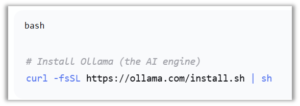
On the Mac Mini, open Terminal (Applications → Utilities → Terminal) and run:
This takes about two minutes.
Step 3: Download Your AI Model
Choose one (or download all three; they coexist peacefully):
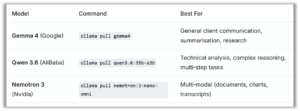
For a wealth manager, start with Gemma 4 – it is the most versatile and well-supported.
The model downloads take 5–20 minutes (one time only). After that, the Mac Mini can be disconnected from the internet.
Step 4: Run the Server

That’s it. The model is now running. You can type questions directly in Terminal.
If you want a proper interface for your team…
Step 5: Install a Web Interface (Like ChatGPT, but Private)
On the Mac Mini, run:
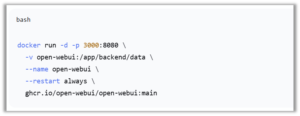
Then open http://[Mac mini IP address]:3000 from any browser on your laptop.
You now have a private, offline, ChatGPT‑clone that answers questions about client portfolios, trust structures, tax strategies, and market research — without any data ever leaving your building.
Step 6: Connect Your Laptop
Find your Mac Mini’s IP address (System Settings → Network → Wi‑Fi → Details). Then on your laptop, open a browser and go to http://[that IP]:3000 .
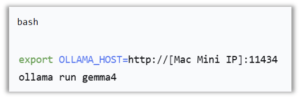
If you prefer a command-line interface on your laptop, install Ollama there too and run:
Real‑World Performance (No Hype)
On a Mac Mini M4 32GB with Gemma 4:
- Metric | Performance
- Response speed | 20–30 tokens per second (faster than you can read)
- First response time | ~1–2 seconds
- Context window | 128K tokens (can process your entire client file in one go)
- Concurrent users | 2–3 people on the same Mac Mini comfortably
- Offline capability | 100% offline after initial download
For a wealth management office with 3–5 advisors, a single Mac Mini running Gemma 4 or Qwen 35B will handle everyone’s AI needs without breaking a sweat.
Privacy & Compliance (The Real Advantage)
Concern | How BYODC Solves It
- Client data sent to OpenAI/Anthropic | Never happens. Data stays on your Mac Mini.
- GDPR / SEC / FINRA compliance | You control the hardware. No third‑party data processing.
- Data residency | Your building, your country, your jurisdiction.
- Audit trail | The Mac Mini logs everything. No “black box”
- Client confidentiality | Absolute. The model never phones home.
Cost Comparison (One Year; in US Dollars)
Cloud API (OpenAI, Claude) | BYODC (Mac Mini + Gemma)
- Upfront hardware | $0 | $799 (Mac Mini)
- Monthly subscription | $20–$200+ per user | $0
- Token fees | $0.01–$0.10 per 1K tokens | $0
- Annual cost (3 users, moderate usage) | $5,000–$20,000+ | $799 (one time)
- Privacy | Data leaves your building | Data never leaves
- Compliance | Paperwork, DPAs, legal reviews | Already compliant (no data transfer)
The Mac Mini pays for itself in 1–6 months depending on your usage.
The Bottom Line
For under $1,000, you can build a private, offline AI server that gives your wealth management team the same capability as ChatGPT or Claude — without any client data leaving your building. No subscription. No token fees. No compliance headaches. The cloud becomes optional. Your desk becomes the data centre. Your clients remain confidential. And you never pay per query again.
One Comment
Comments are closed.

Interesting, will give it a try!